Protocol d’actuació
L’objectiu d’aquesta pràctica és vincular una màquina client Ubuntu al domini Active Directory illa1.net per permetre l’autenticació centralitzada. Com a prerequisit indispensable, el client Linux ha de tenir configurada la IP del Controlador de Domini (10.24.2.194) com a servidor DNS principal, i l’hora del sistema ha d’estar sincronitzada amb el servidor per complir amb les exigències de seguretat de Kerberos. El procés constarà de dues fases: la instal·lació de les dependències i la vinculació al domini, seguides d’una demostració de funcionament.
Instal·lació
En primer lloc, instal·lem les utilitats necessàries per fer la nostra vinculació al Servidor AD i comprovem que el procés finalitza sense errors.
sudo apt update
sudo apt install sssd-tools sssd libnss-sss libpam-sss adcli samba-common-bin
Vinculació al domini
Una vegada instal·lats els paquets, procedim a vincular la màquina al domini illa1.net utilitzant les credencials autoritzades de l’usuari vagrant. L’argument -v ens permet fer un seguiment detallat de la connexió amb el Controlador de Domini.
sudo realm join -v -U vagrant illa1.net
log de la comanda
 * Resolving: _ldap._tcp.illa1.net
 * Performing LDAP DSE lookup on: 10.24.2.194
 * Successfully discovered: illa1.net
Password for vagrant:
 * Unconditionally checking packages
 * Resolving required packages
 * Joining using a truncated netbios name: PLANTUBUNTU-VIR
 * LANG=C /usr/sbin/adcli join --verbose --domain illa1.net --domain-realm ILLA1.NET --domain-controller 10.24.2.194 --computer-name PLANTUBUNTU-VIR --login-type user --login-user vagrant --stdin-password
 * Using domain name: illa1.net
 * Using computer account name: UBUNTU-VIR
 * Using domain realm: illa1.net
 * Sending NetLogon ping to domain controller: 10.24.2.194
 * Received NetLogon info from: WIN-2ISUSQIBKRU.illa1.net
 * Wrote out krb5.conf snippet to /var/cache/realmd/adcli-krb5-nWmhRr/krb5.d/adcli-krb5-conf-7umqaF
 * Authenticated as user: vagrant@ILLA1.NET
 * Using GSS-SPNEGO for SASL bind
 * Looked up short domain name: ILLA1
 * Looked up domain SID: S-1-5-21-2037980830-2354978206-3898932875
 * Received NetLogon info from: WIN-2ISUSQIBKRU.illa1.net
 * Using fully qualified name: plantubuntu-VirtualBox
 * Using domain name: illa1.net
 * Using computer account name: PLANTUBUNTU-VIR
 * Using domain realm: illa1.net
 * Enrolling computer name: PLANTUBUNTU-VIR
 * Generated 120 character computer password
 * Using keytab: FILE:/etc/krb5.keytab
 * A computer account for PLANTUBUNTU-VIR$ does not exist
 * Found well known computer container at: CN=Computers,DC=illa1,DC=es
 * Calculated computer account: CN=PLANTUBUNTU-VIR,CN=Computers,DC=illa1,DC=es
 * Encryption type [3] not permitted.
 * Encryption type [1] not permitted.
 * Created computer account: CN=PLANTUBUNTU-VIR,CN=Computers,DC=illa1,DC=es
 * Trying to set computer password with Kerberos
 * Set computer password
 * Retrieved kvno '2' for computer account in directory: CN=PLANTUBUNTU-VIR,CN=Computers,DC=illa1,DC=es
 * Checking RestrictedKrbHost/plantubuntu-VirtualBox
 *    Added RestrictedKrbHost/plantubuntu-VirtualBox
 * Checking RestrictedKrbHost/PLANTUBUNTU-VIR
 *    Added RestrictedKrbHost/PLANTUBUNTU-VIR
 * Checking host/plantubuntu-VirtualBox
 *    Added host/plantubuntu-VirtualBox
 * Checking host/PLANTUBUNTU-VIR
 *    Added host/PLANTUBUNTU-VIR
 * Discovered which keytab salt to use
 * Added the entries to the keytab: PLANTUBUNTU-VIR$@ILLA1.NET: FILE:/etc/krb5.keytab
 * Added the entries to the keytab: host/PLANTUBUNTU-VIR@ILLA1.NET: FILE:/etc/krb5.keytab
 * Added the entries to the keytab: host/plantubuntu-VirtualBox@ILLA1.NET: FILE:/etc/krb5.keytab
 * Added the entries to the keytab: RestrictedKrbHost/PLANTUBUNTU-VIR@ILLA1.NET: FILE:/etc/krb5.keytab
 * Added the entries to the keytab: RestrictedKrbHost/plantubuntu-VirtualBox@ILLA1.NET: FILE:/etc/krb5.keytab
 * /usr/sbin/update-rc.d sssd enable
 * /usr/sbin/service sssd restart
 * Successfully enrolled machine in realm
Demostració i Pla de proves
Per confirmar que la configuració funciona correctament s’estableix la següent demostració amb les comandes pertinents. Primer fem una verificació si la resposta retorna un UID i un GID procedents del domini, es confirma que el protocol d’adhesió ha tingut èxit
id scano

uid=190807421(scano) gid=190800545(domain users) groups=190800545(domain users)
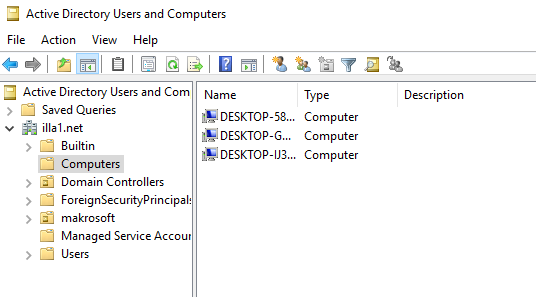
I per comprobar desde el AD podem veure les maqquines windows i la linux conectada